
For small teams and service businesses
The friendly CRM that fetches every follow-up.
People, deals, calendars and email in one colorful place, with online booking, floor plans, pets and boarding for groomers, kennels, consultants and every small team in between.
No credit card. No passwords.


See it with a business like yours
Five made-up businesses, each filled in with weeks of real-looking work. Open one and click around: it’s yours to change, and nothing in it is ever sent anywhere.
Bubbles & Bows Grooming
A salon with three groomers, four tables, two tubs and a drying station, and a couple of dozen regulars with their dogs.
Try the live dog grooming sampleSign in with Google or an email code and you’re straight in. No passwords, no credit card.
What it shows
- Each groomer’s week on one calendar, with online booking that picks a free table or tub
- Calendar → Floor: which tables and tubs are in use right now, and who’s next
- Clients with their dogs: breeds, notes, vaccinations and a portrait of each
- A new-client form, automations that make the follow-up tasks, texts and newsletters
- Reports on the dashboard: new clients by source, the week’s activity, overdue tasks
- Before and after photos on a client’s timeline, added from a phone or a computer
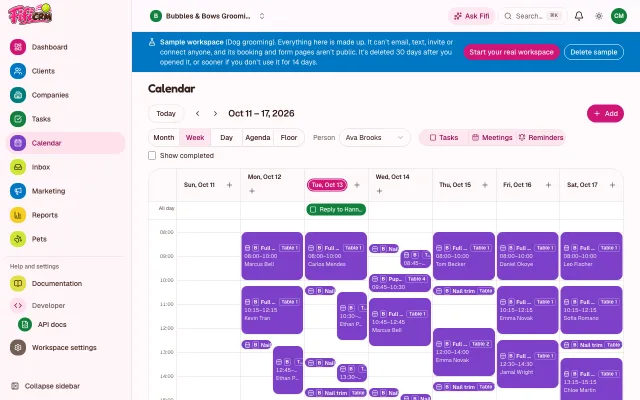
A groomer’s week 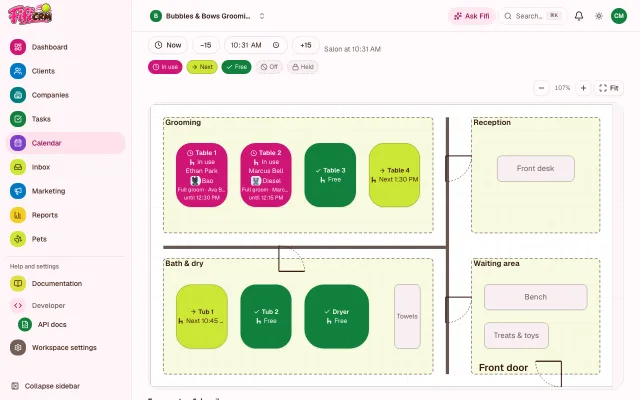
Calendar → Floor, right now 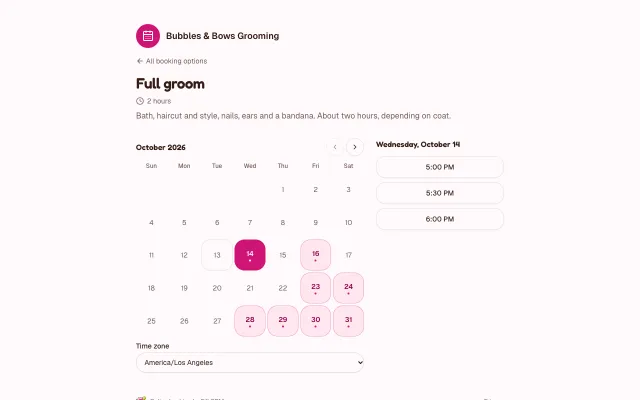
The online booking page 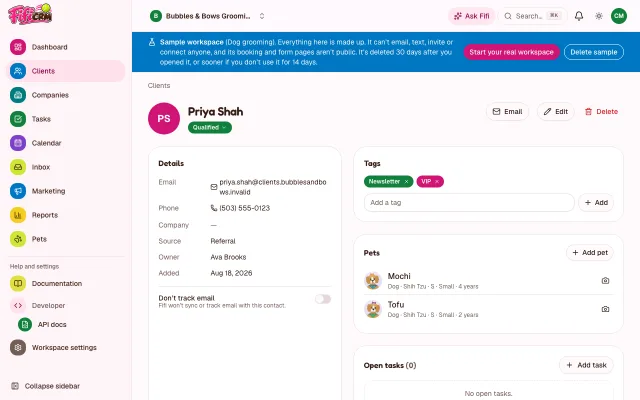
A client and her dogs


Happy Tails Boarding
Kennels, suites and a grooming room on one floor plan, with dogs and cats checking in and out all week.
Try the live pet boarding sampleSign in with Google or an email code and you’re straight in. No passwords, no credit card.
What it shows
- The kennel board: every stay, night by night, with who arrives and leaves today
- The Floor view: who’s in which kennel or suite, on your own floor plan
- Pets with their vaccinations, expiry badges, notes and portraits
- Today’s arrivals and departures on the dashboard
- “Bath before going home” bookings in the grooming room’s tubs on check-out mornings
- A photo of each guest settled into its kennel, on the owner’s timeline
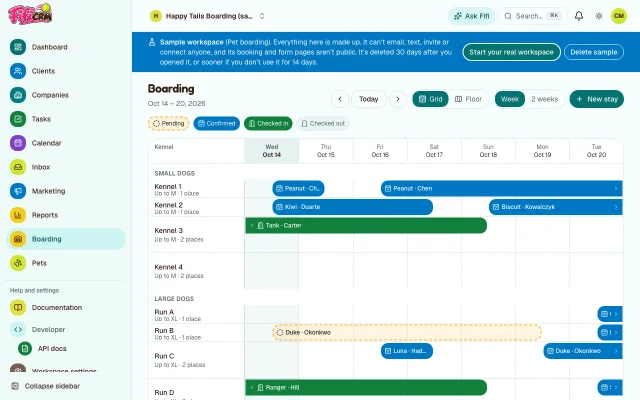
The kennel board 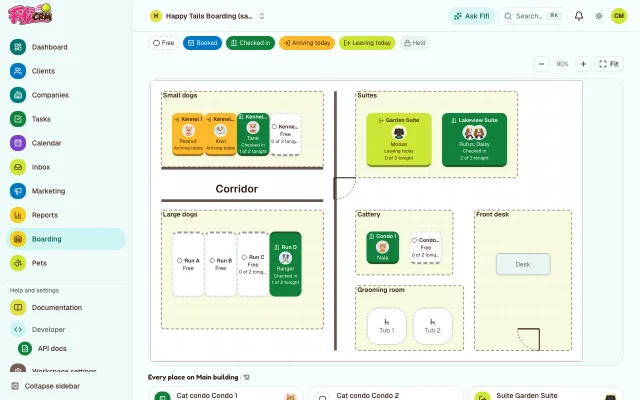
Who’s in which kennel 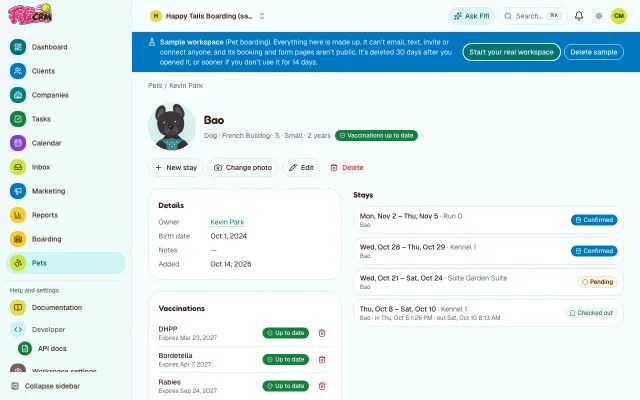
A pet and its vaccinations 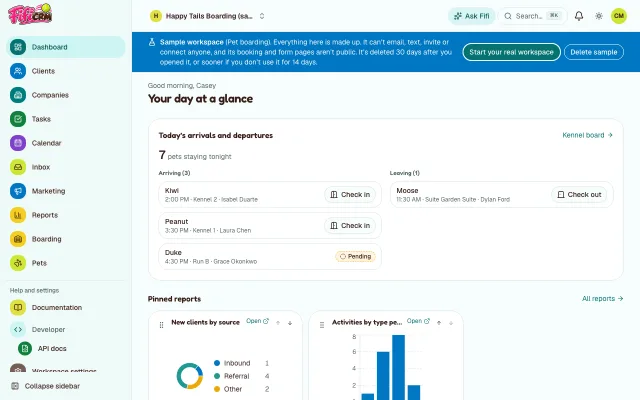
Today at a glance


Northbeam IT Consulting
An IT practice with a dozen client companies, projects from assessment to contract, and the email behind them.
Try the live IT consultant sampleSign in with Google or an email code and you’re straight in. No passwords, no credit card.
What it shows
- Projects on a pipeline board, from assessment requested to contract
- Client companies with their people, projects, calls and email history
- Discovery calls and assessment walkthroughs booked online
- Saved reports and charts, pinned to the dashboard
- Ask Fifi: questions in plain words, answered from your own reports
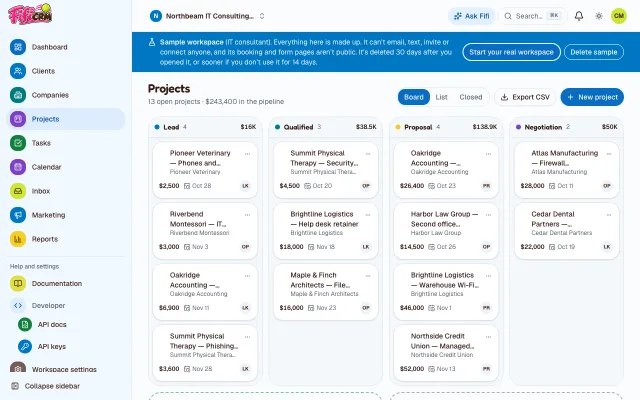
The pipeline board 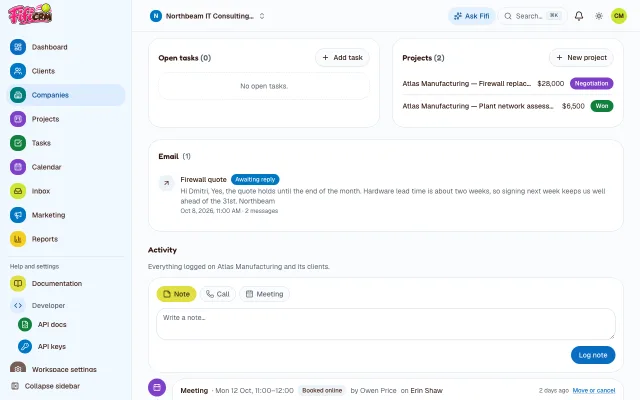
A client company 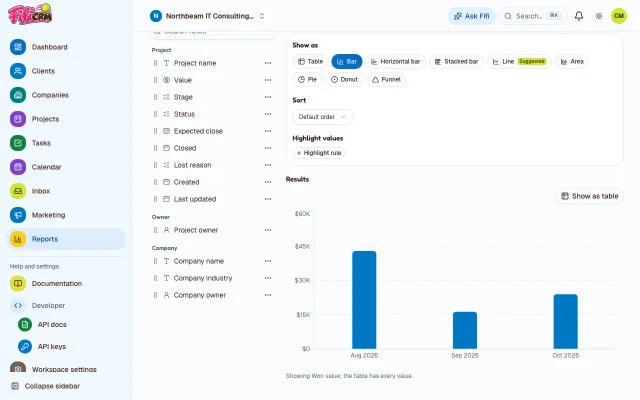
Reports and charts 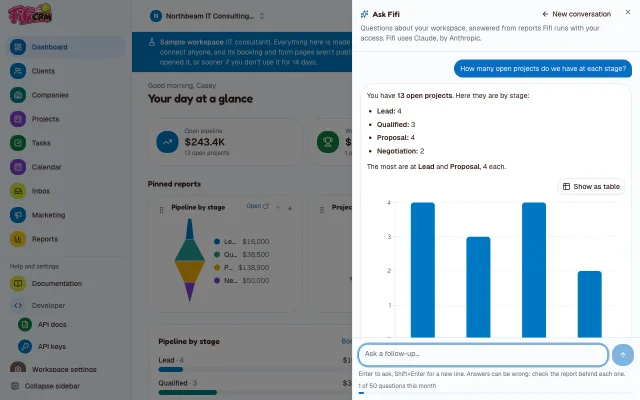
Ask Fifi


Ridgeline Pest Control
A pest control company with an office manager and three technicians, homes and businesses on service plans, and a week of visits booked online.
Try the live pest control sampleSign in with Google or an email code and you’re straight in. No passwords, no credit card.
What it shows
- Each technician’s visits on one calendar: termite and rodent inspections, pest services and mosquito treatments, booked online
- Service agreements on a pipeline, from inspection requested to signed, each named for the service and the place
- Households with their service address, and commercial accounts and realtors with their people
- A free-inspection form whose automation makes the call-back task, appointment reminders and “on my way” texts
- Reports on the dashboard: agreements won by month, the pipeline by stage and visits by type
- Photos of the work on each service record and customer: the ant trail, the bait station, the site
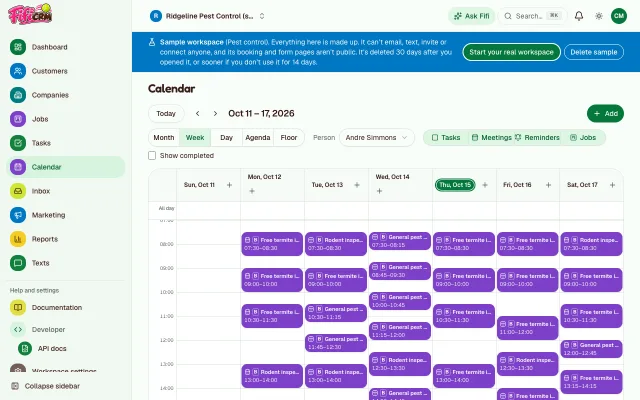
A technician’s week 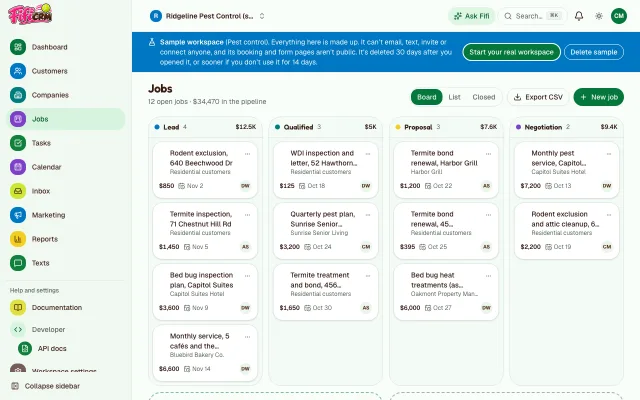
Agreements on the pipeline 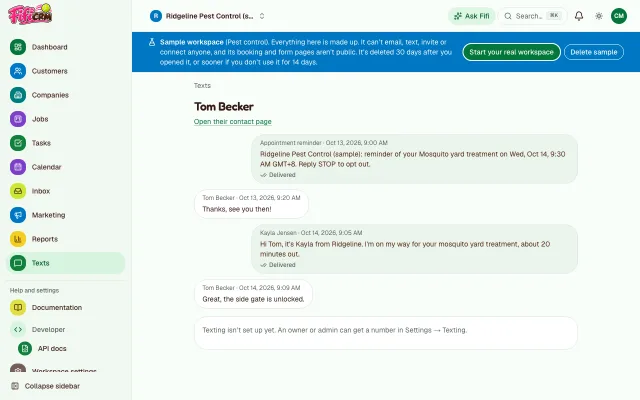
Texts on the way 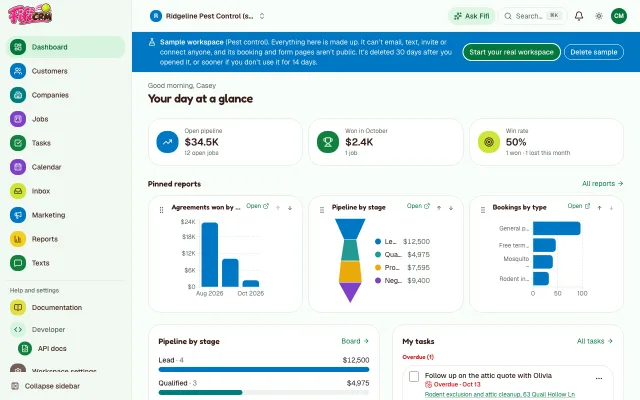
Reports on the dashboard


Lakeshore Freight
A freight company with a cross-dock, ten shippers and their lanes, five partner carriers, and drivers checking in by text.
Try the live trucking and logistics sampleSign in with Google or an email code and you’re straight in. No passwords, no credit card.
What it shows
- Loads on a board from open to delivered: pickups and deliveries in each stop’s own time zone, carrier pay and margin, check calls, and today’s stops
- Calendar → Floor: the cross-dock’s eight doors, which are in use right now and which load comes next
- Dock appointments at a door their load can use, reefer loads at the two reefer doors
- Lanes on a pipeline from lead to won, each valued at a year’s revenue
- Shippers and carriers with their people, email history, dock and damage photos, and tasks like an expiring insurance certificate
- Driver check-ins by text, a quote form, and a driver application whose automation tags each applicant
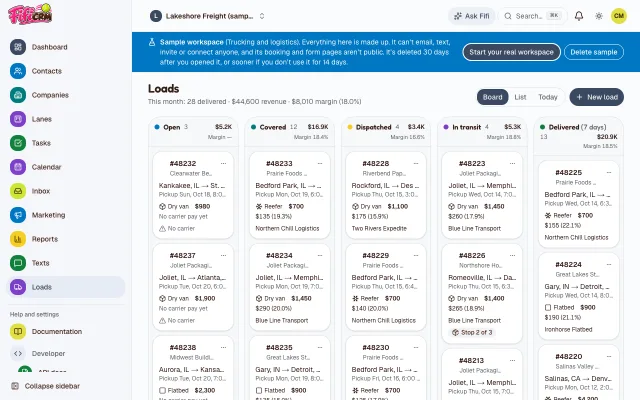
Loads on the board 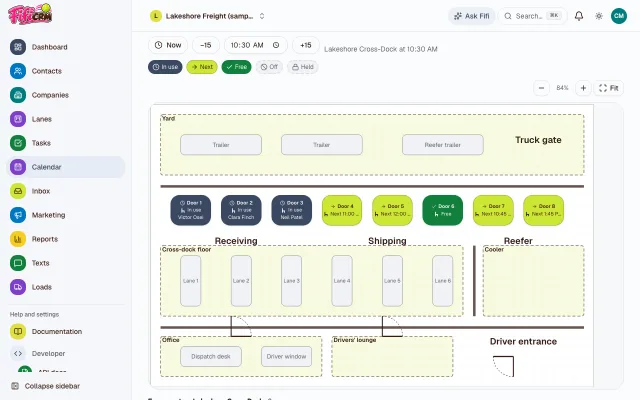
The cross-dock right now 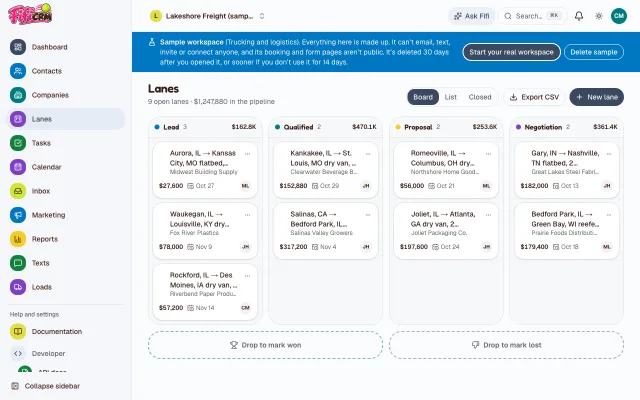
Lanes on the pipeline 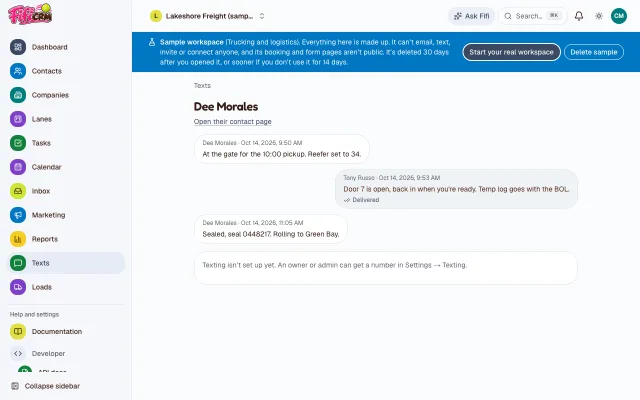
A driver checking in


Play with the salon floor
Bubbles & Bows’ salon, right here in your browser. Drag the time through the day and watch the tables and tubs fill up: who’s in, who’s next and what’s free. No account needed.
Bubbles & Bows Grooming · Salon
- In use · 3
- Next · 2
- Free · 2
Every seat · 3 in use, 2 next, 2 free
Table 1 today
This is the real Floor view, with the grooming sample’s salon. Try the full sample
Everything Fifi does
Turn on what your business needs in Settings → Modules; the rest stays out of the way. Each one has a guide.
Customers and sales
Contacts and companies
People linked to their companies, with tags, lead status and a timeline of every note, call, meeting, photo and email.
Read the guide: Contacts and companiesDeals and pipeline
Drag deals through your stages on a colorful board, with values, won and lost, and the numbers that follow.
Read the guide: Deals and pipelineTasks and reminders
Follow-ups with due dates in your time zone, reminders, and Overdue, Today and Upcoming at a glance.
Read the guide: Tasks and remindersCalendar
Month, week, day and agenda views of meetings, bookings and tasks, for you or the whole team. Drag to reschedule.
Read the guide: Calendar
Email and marketing
Email
Connect Gmail: conversations land on each contact, and you send from Fifi and see who opened and replied.
Read the guide: EmailCampaigns
Designed newsletters to a list, sent from your own mailbox, with opens, clicks, replies and unsubscribes.
Read the guide: CampaignsMedia library and AI social posts
Your photos and videos in one library, and social posts drafted from them for you to edit and share.
Read the guide: Media library and AI social postsTextingComing soon
Your own number to text clients from, with replies on their timeline and appointment reminders by text.
Read the guide: Texting
Bookings, pets, places, service records, loads and invoices
Online booking
Booking pages where clients pick a time with your team and a free seat, plus booking from inside Fifi for the front desk.
Read the guide: Online bookingPets and vaccinations
Each client’s pets with breed, size, notes and a photo, and vaccinations badged before they expire.
Read the guide: Pets and vaccinationsBoarding and the kennel board
Kennels and suites, multi-night stays with check-in and check-out, and a board of who’s staying when.
Read the guide: Boarding and the kennel boardFloor plans
Draw your rooms, place tables, tubs and kennels, and see what’s in use at any time of day.
Read the guide: Floor plansService records
What was applied on each visit, with EPA numbers, amounts and the technician’s licence: printed or emailed to the customer, and kept 3 years.
Read the guide: Service recordsLoads
Shipments with their stops, time windows in each stop’s zone, customer rate, carrier pay and margin, on a board from open to delivered, with check calls.
Read the guide: LoadsInvoices
Numbered invoices from your visits, stays, records, deals and loads: emailed with a private link, printed or saved as PDF, with the payments you record, what each customer owes and how late, and reminders. Kept 7 years.
Read the guide: Invoices
Forms, reports and AI
Forms
Lead forms for your website that add contacts, with their answers on the timeline.
Read the guide: FormsAutomations
When a form comes in or a booking is made, create a task, add a tag, assign an owner or email the team.
Read the guide: AutomationsReports and the dashboard
Charts and tables from your records: save and share them, export them, and pin them to your dashboard.
Read the guide: Reports and the dashboardAsk Fifi
Ask about your workspace in plain words; Fifi answers by running reports with your access. A paid add-on.
Read the guide: Ask Fifi
Connected, yours and safe
API and webhooks
API keys for your own integrations, and webhooks that tell other apps when records change.
Read the guide: API and webhooksColor schemes
Seven color schemes, each in light and dark: pick one at setup for the workspace, or one just for you.
Read the guide: Color schemesPrivate and secure
Every workspace isolated in the app and in the database, nightly encrypted backups, and no passwords: Google, Apple or an email code.
Read the guide: Private and secure
Plans and prices
Every workspace starts on Free. Pick the plan that fits when you need more.
During the beta, everything is included: every module and add-on, at Business limits. There’s no billing yet; the prices below apply once it starts.
Free
The core CRM for getting started: records, tasks, calendar, a pipeline, basic reports and one mailbox, for up to 3 people.
$0 a month
For up to 3 members.
Includes
- Contacts, companies, tasks, the calendar, search, import and export, and a timeline of notes, calls and meetings
- Deals and pipeline
- Reports
- Members
- 3
- Connected mailboxes
- 1
- Campaign emails a month
- Not included
- Texts a month
- Not included
- Booking types
- Not included
- Photo, media and document storage
- Not included
Start freeNo credit card needed.
Pro
For growing teams and service businesses: campaigns, full reports, online booking, forms and automations, invoices with online payments, the API and webhooks. Add Ask Fifi for $5 a month.
$39 a month
or $390 a year (two months free)
Includes 3 members; each extra member is $12 a month, up to 10.
Everything in Free, plus
- Campaigns
- API and webhooks
- Forms and automations
- Online booking
- Pets
- Boarding
- Service records
- Loads
- Invoicing
- Invoices started from a visit, stay, service record, deal or load, with sales tax and terms
- A customer link to view, print and pay; send by email or print
- Payments by hand, receivables and reminders
- Online payments by card or US bank debit through your own Stripe account
- QuickBooks Online sync, and a file export for QuickBooks Online and Desktop
- Ask Fifi add-on: $5 a month for 50 questions a month
- Members
- 10
- Connected mailboxes
- 10
- Campaign emails a month
- 5,000
- Texts a month
- Not included
- Booking types
- 5
- Photo, media and document storage
- 10 GB
Start freeEverything on Pro is included free during the beta.
Business
Everything, at the highest limits: texting for the whole team, more booking types, higher API limits and 50 GB of storage. US carriers’ texting registration fees are passed on at cost (from $19.50 once and $1.50 a month). Add Ask Fifi for $5 a month.
$89 a month
or $890 a year (two months free)
Includes 5 members; each extra member is $15 a month.
Everything in Pro, plus
- Texting
- Ask Fifi add-on: $5 a month for 50 questions a month
- Members
- Unlimited
- Connected mailboxes
- Unlimited
- Campaign emails a month
- Unlimited
- Texts a month
- 2,000
- Booking types
- 20
- Photo, media and document storage
- 50 GB
Start freeEverything on Business is included free during the beta.
Prices are in US dollars, per workspace. Plans are changed by Fifi support (support@fetchfifi.com), and changing plans never deletes anything. US carriers charge a one-time registration fee, passed on at cost: from $19.50, and from $1.50 a month. Every limit, plan by plan
Questions
Is my data private?
Yes. Every workspace is kept apart twice: by the app, and by the database itself, which refuses another workspace’s rows. Backups are taken every night and encrypted.
Can I get my data out?
Yes, all of it. An owner can download the whole workspace as a ZIP of CSV files from Settings → Workspace → Export everything, and any list exports to CSV.
What’s a sample?
A made-up business filled in with a few weeks of work, so you can click around before you set up your own. Nothing in it is ever sent anywhere, it doesn’t count toward your workspaces, and it’s deleted within 30 days (sooner if nobody uses it for two weeks).
Does it work on phones?
Yes. Every page works on a phone, from the calendar and the Floor view to the kennel board, in light and dark.
Can I change the colors?
Yes. Pick one of seven color schemes when you set up your workspace, change it later in Settings → Workspace, or choose your own in your profile. Fifi pink is the default.
Ready when you are
Try a sample first, or start your own workspace. It’s free, and it takes a minute.