
Create and send your first invoice
About 25 minutes · For everyone · Needs Pro or Business · Last checked in v0.61.0, Oct 2026
This guide takes you from nothing to an invoice in your customer's hands. You can start from a record Fifi already has (a visit, a stay, a service record, a deal or a delivered load) or type the lines yourself. It doesn't cover taking payment (Record payments) or the things Fifi leaves out, such as recurring invoices and credit notes (What Fifi doesn't do).
Before you start
- Who can do it: any member. Correcting or voiding an issued invoice is for owners and admins.
- Needs: the Invoicing module (Pro or Business), set up as in Set up invoicing.
- Have ready: a customer in Fifi (a contact, a company, or both) with an email address on at least one contact if you want Fifi to email the invoice. What you're billing for, with quantities and prices.
Steps
- Open Invoices and click New invoice. To start from a record instead, use the Invoice button (see the next section); the customer and the first line arrive filled in.
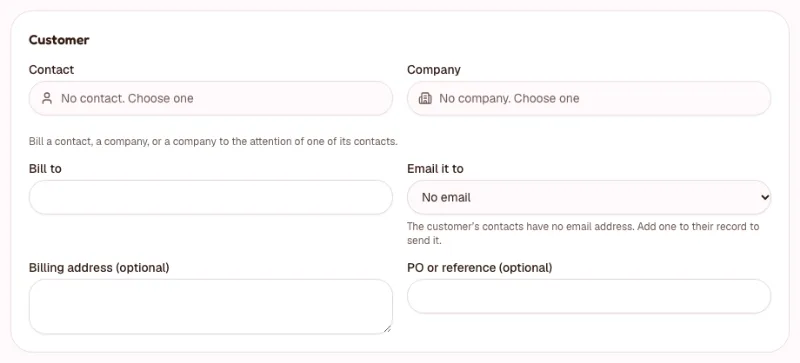
- Under Customer, pick a Contact, a Company, or both. Choose both to bill a company to the attention of one of its contacts.
- Check Bill to. It's the name on the invoice (the company's name, else the contact's). The invoice keeps its own copy, so you can edit it.
- Choose Email it to: one of the customer's contacts' email addresses. If there is none, add one to their record first, or use Mark as sent… later.
- Fill in PO or reference (optional) if the customer wants one on the invoice.
- Leave Invoice date empty to use the day you issue it. Pick Terms: Fifi uses your default. Custom asks for a Due date.
- Check Tax name and Tax rate (%). They start from your settings and apply to this invoice only.
- Under Lines, fill in Description, Quantity and Unit price for the first line. Taxable starts ticked while your tax rate is above 0%. Untick it for a line that isn't taxed.
- Click Add line for each further line. Click Add from records to pull in the customer's visits, stays, service records, deals or loads from the last 180 days that aren't on an invoice yet. Tick them and click Add.
- Check the Subtotal, the tax line and the Total under the lines. They update as you type.
- Add Notes (optional) if you want words on the invoice. Your default notes are already there.
- Click Save draft. Fifi opens the draft's page. Click Preview to see the invoice as your customer will.
- On the draft's page, click Send… and confirm with Send to issue the invoice and email it. Or click Mark as sent… to issue it without emailing it. The editor has the same two choices: Send…, and Mark as sent… under More.
What you'll see: the invoice page with a number such as INV-1001 and the status Sent. After Send… it says "Emailed Oct 15 to megan@…". If you sent from the editor itself, a banner also says "Invoice sent." or, for Mark as sent…, "Invoice issued and marked as sent. Nothing was emailed."
Tip
A draft can be saved, edited and previewed as often as you like, and has no number until you issue it. If you leave a draft unfinished, it waits in the Drafts tab.
Start from a record
The Invoice button turns a record into an invoice line, so you don't retype what Fifi knows. Each record can be on one invoice at a time; after that the record shows Invoiced with the invoice's number. A deal can be billed in parts, so it can be on several.
| Record | Where the button is | The line says | The price |
|---|---|---|---|
| A visit | The visit's details in the calendar | The booking type and the date, such as "Full groom, Oct 3, 2026". Quantity 1 | The last price you charged for that booking type. Type one the first time |
| A boarding stay | The stay's details on the kennel board | One line for the whole stay: nights as the quantity, the nightly price for all its pets as the unit price | The stay's price. See Invoicing a boarding stay |
| A service record | The record's page | The service and the date. Quantity 1. A record that belongs to a visit is billed as the visit | The last price you charged for that service |
| A deal | New invoice on the deal's Invoices card | The deal's name, quantity 1 | The deal's value. Change it to bill a deposit or a milestone |
| A load | The Invoice button on a delivered load | "Load #1042: Joliet, IL → Memphis, TN, delivered Oct 3". Quantity 1 | The load's customer rate. The shipper's reference becomes the PO |
A visit has to be confirmed and started. A load has to be delivered. A cancelled, voided or lost record can't be billed. Staff can change anything on the draft before they send it; a line is only a starting point.
How tax and rounding work
Money is in US dollars and cents. A line's total is its quantity times its unit price, rounded to the cent (half a cent rounds away from zero). The tax is worked out once, on the sum of the taxable lines, at the invoice's rate, and rounded once. The total is the subtotal plus the tax.
For example, take three hours at $33.33, taxable, at 8.875%. The subtotal is $99.99. Tax is $99.99 × 8.875% = $8.874…, which rounds to $8.87. The total is $108.86.
A quantity of 1.5 at $33.33 is $49.995, which rounds to $50.00.
To give a discount, add a line with a negative unit price, such as -25. Untick Taxable on it only if the discount shouldn't lower the tax.
Worked examples
These show what the lines can look like for five kinds of business. The totals are computed by Fifi's own code.
A groomer's visit
Rex's full groom was a visit. Click Invoice on it. Fifi writes "Full groom, Oct 3, 2026". Type the price, 65, then add a line for "Nail grind" at 12. With tax at 0%, the subtotal and total are both $77.00.
A boarder's stay
Bo and Mia stayed in the Family suite from Dec 22 to Dec 27. Click Invoice on the stay. Fifi makes one line:
| Description | Quantity | Unit price | Line total |
|---|---|---|---|
| Boarding, Family suite: Bo and Mia, Dec 22–27 (5 nights; 2 pets at $85.00 + $50.00 a night) | 5 | $135.00 | $675.00 |
The unit price is the whole nightly price for both pets. With tax at 0%, the total is $675.00.
A pest control service record
Harbor Grill's service record becomes a line. Edit the description to "General pest service, Oct 3", set the quantity to 3 (three treated areas) and the price to 33.33. Add "Bait station refill", 4 at 7.50, and "Trip charge", 1 at 15. Untick Taxable on the trip charge. Tax is 8.875%, terms Net 30.
| Description | Quantity | Unit price | Taxable | Line total |
|---|---|---|---|---|
| General pest service, Oct 3 | 3 | $33.33 | Yes | $99.99 |
| Bait station refill | 4 | $7.50 | Yes | $30.00 |
| Trip charge | 1 | $15.00 | No | $15.00 |
The subtotal is $144.99. The taxable lines add up to $129.99, so the tax is $11.54. The total is $156.53, due Nov 2, 2026.
A consultant's retainer
Type one line: "Monthly retainer, October", quantity 1, unit price 2500, Taxable unticked. Choose Net 45 for the terms. The total is $2,500.00. Next month, open the invoice, click More actions and choose Duplicate: you get a new draft with the same customer and line. Change October to November and send it.
A freight load
A delivered load has the shipper's reference in it. Click Invoice on the load. The line reads "Load #1042: Joliet, IL → Memphis, TN, delivered Oct 3", quantity 1, at the customer rate of $1,850.00. The shipper's reference fills PO or reference (optional). Choose Net 30 terms. The total is $1,850.00.
What the customer gets
When you click Send, the customer gets an email from Fifi CRM in your business's name. The subject reads "Invoice INV-1042 from Ridgeline Pest Control: $156.53 due Nov 2, 2026". The email shows the whole invoice and a View invoice button. Replies go to you.
The button opens the customer link, a private page. Anyone with the link can see the invoice without signing in, so share it as you would the invoice itself. It never shows the email address the invoice was sent to. Your payment instructions are on it.
- Copy customer link on the invoice page gives you the link, if you marked the invoice as sent and want to text it.
- Print opens the invoice alone. Click Print or save as PDF there and your browser's print dialog opens, for paper or a PDF.
- The page shows "Link opened" with a date once the customer's link has been opened. Some email services open links to check them, so this may not mean the customer read it.
If the email fails, the invoice is still issued. Fifi says "Issued, but the email didn't go. Try Resend." and the invoice page offers Resend….
After you send it
An issued invoice's amounts, lines, customer and number are locked, so what the customer has stays true.
- Correct details… (More actions; owners and admins) changes the terms and due date, notes, PO, email address and billing address. The page records who corrected it.
- Void… (More actions; owners and admins) cancels the invoice with a reason. It keeps its number and shows Void. Fifi won't void an invoice that has payments; refund or void the payments first. The records on it can be invoiced again.
- Duplicate copies the customer and lines into a new draft.
To change an amount, void the invoice, then duplicate it, fix the draft and send the new one.
What you'll see
On the invoice page: the number and status badge (Draft, Sent, Overdue, Void), the customer and total, "Emailed Oct 15 to megan@…" when it was emailed, "Link opened" once the customer opens it, and the Payments section. On a contact's or company's page, the Invoices card lists it. In Invoices, it appears in the Open tab until it's paid.
Check your work
- To do: The customer, Bill to and Email it to are right.
- To do: Each line has the right Quantity, Unit price and Taxable setting.
- To do: The tax line and the Total are what you expect.
- To do: The Terms give the due date you want.
- To do: You previewed the draft before sending.
- To do: After sending, the status is Sent and the page says it was emailed (or that you marked it as sent).
Troubleshooting
| What you see | Why | What to do |
|---|---|---|
| "There's no email address for this customer. Pick one of their contacts' addresses, or add one to their record." | The customer has no contact email | Add an email to the contact, or use Mark as sent… and deliver the invoice yourself |
| "That's already on invoice INV-1043." | The record is already billed | Open that invoice, or void it to bill the record again |
| "That record can't be billed yet (a visit on a later day, a draft or a load not delivered)." | The record isn't finished | Finish or deliver it, then try again |
| "An invoice needs an amount due: its lines must add up to more than $0.00 before tax." | The lines total nothing | Add a line with a price |
| "The taxable lines add up to less than $0. Untick Taxable on the discount line, or lower it." | A taxable discount is bigger than the taxable lines | Untick Taxable on the discount |
| "This invoice can't be emailed again today (5 a day per invoice, and a daily limit per address). Try again tomorrow." | You hit a daily email limit | Try tomorrow, or Mark as sent… and send the link yourself |
| "Issued, but the email didn't go. Try Resend." | The email service didn't accept it | Click Resend…. The invoice is already issued |
More in Invoicing troubleshooting.
Related
- Record payments and chase overdue invoices: the next step.
- Invoices: the full reference for lines, the customer link and keeping invoices 7 years.
- Boarding and pets: rates for stays.
- Service records and Loads: the records you can bill.
- Choose how you'll invoice: the options behind these steps.
Something out of date? Tell us.