
Know your numbers
About 20 minutes · For owners and admins · Last checked in v0.61.0, Oct 2026
A few minutes with the dashboard, three pinned reports and a question to Ask Fifi tell you how the business is going without building spreadsheets. This guide sets those up. It doesn't cover every report option; the full builder is in Reports.
Before you start
- Who can do it: anyone can read the dashboard, build and pin their own reports, and ask questions once Ask Fifi is on. Owners and admins turn Ask Fifi on and buy more questions.
- Needs: the Reports module (on the Free plan). Ask Fifi is an add-on: $5 a month for 50 questions, and it also needs Reports on.
- Have ready: a few days of real records. Reports are only as useful as the data in them.
Steps
1. Read your dashboard
- Click Dashboard in the menu.
- Look at Your day at a glance. It shows cards for the modules you have on: your open tasks, the pipeline by stage, email waiting for a reply, recent activity, and, with Invoicing, what is owed and what came in.
- Click through where a card links to a list: the pipeline to the Board, and the money numbers to the Invoices and Payments lists.
The dashboard is yours: each person sees their own tasks and pins. The full list of cards is in Dashboard and daily digest.
2. Pin three reports
Pinned reports show as tiles under Pinned reports on your dashboard, up to 12.
- Click Reports, then New report.
- Under Or start from a template, pick a template. Fifi lists the ones that fit your business type first. The three to start with are below.
- Click Save report, type a Name, choose Who can see it (Only me or Everyone in the workspace) and save.
- Click Pin to dashboard. You'll see "Pinned to your dashboard."
- Repeat for the other two.
| Business type | Three reports to pin |
|---|---|
| B2B sales | “Pipeline by stage”, “Won deals by month”, “Deals by owner” |
| Agency or consulting | “Pipeline by stage”, “Projects by owner”, “Won projects by month” |
| Appointment services | “New clients by source”, “Activities by type per week”, “Overdue tasks by assignee” |
| Pet services | “New clients by source”, “Activities by type per week”, “Overdue tasks by assignee” |
| Home and field services | “Pipeline by stage”, “Overdue tasks by assignee”, “Won jobs by month” |
| Real estate | “Pipeline by stage”, “Won deals by month”, “Deals by owner” |
| Nonprofit | “New supporters by source”, “Campaign results”, “Activities by type per week” |
| Freight and logistics | “Pipeline by stage”, “Won lanes by month”, “Lanes by owner” |
| Other | “Pipeline by stage”, “Won deals by month”, “Deals by owner” |
A template needs its module on. If you don't see one, the module behind it is off. To reorder tiles, drag the grip on a tile or use Move earlier and Move later.
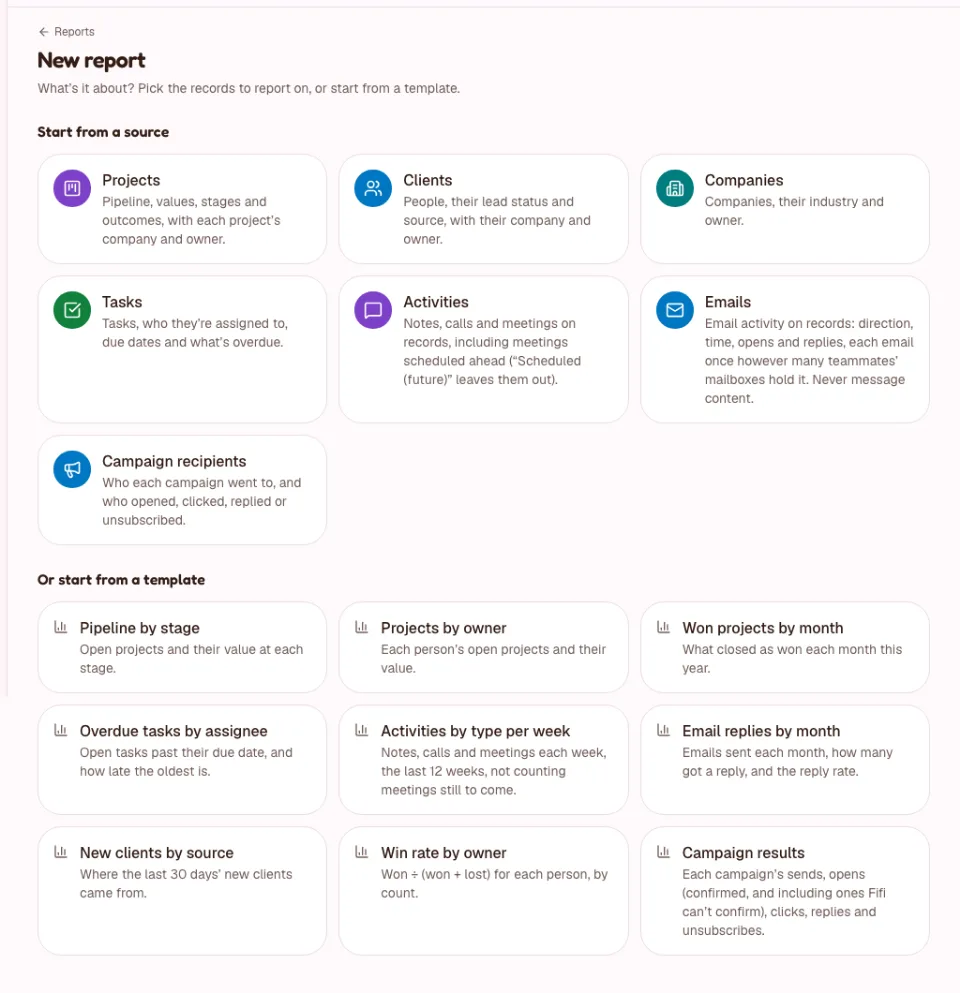
3. Build one report of your own
- Click Reports, then New report.
- Under Start from a source, pick what to report on, for example Contacts.
- Drag a field from Fields into Group by (for example Source) and click Count records under Values.
- Under Show as, pick Bar or Table. Fifi marks one as Suggested.
- Click a bar to see the records behind it.
- Click Save report, name it and save. Pin it if you will look at it often.
Every drag also has a menu or a keyboard path; see Reports. Reports only read your records. They never change anything.
4. Ask Fifi
Ask Fifi answers a question about your workspace in plain English, using reports it builds for you.
- An owner or admin opens Settings → Workspace and switches Ask Fifi on. It is off by default, and the page says exactly what is sent to Anthropic.
- Click Ask Fifi in the top bar, or press ⌘J (Ctrl+J on Windows).
- Type a question or click a suggestion, then press Enter.
- Check the report behind the answer, and click Open as report to change and save it.
Until Fifi's AI service is set up, Settings → Workspace shows "Coming soon" for Ask Fifi and there is no button in the top bar. Answers can be wrong, so always check the report behind them.
What Claude sees. It sees your question, the names of the fields it can report on, teammates' names (not their email addresses) and the results of the reports it runs, which can include contact email addresses when a report lists them. It never sees email bodies, subjects, notes, comments or files. The full list is in Ask Fifi.
Starter questions. These are what Fifi suggests first for each business type, in your workspace's words.
| Business type | Five questions to start with |
|---|---|
| B2B sales | “How many deals did we win this month, and what were they worth?” · “Which open deals over $10k close this quarter?” · “Who has the most overdue tasks?” · “Reply rate on last month’s campaigns” · “How many new contacts did we add this month, by source?” |
| Agency or consulting | “Which open projects close this quarter?” · “How many projects did we win this month, and what were they worth?” · “Who has the most overdue tasks?” · “How many of our emails got a reply last month?” · “How many new clients did we add this month, by source?” |
| Appointment services | “How many new clients did we add this month, by source?” · “How many meetings did we log each week this month?” · “Which tasks are due this week?” · “Reply rate on last month’s campaigns” · “Who has the most overdue tasks?” |
| Pet services | “How many new clients did we add this month, by source?” · “How many meetings did we log each week this month?” · “Which tasks are due this week?” · “Reply rate on last month’s campaigns” · “Who has the most overdue tasks?” |
| Home and field services | “Which open jobs close this quarter?” · “What did each person win this quarter?” · “Which tasks are due this week?” · “Who has the most overdue tasks?” · “How many new customers did we add this month, by source?” |
| Real estate | “Which open deals close this quarter?” · “How many deals did we win this month, and what were they worth?” · “How many new contacts did we add this month, by source?” · “Who has the most overdue tasks?” · “Reply rate on last month’s campaigns” |
| Nonprofit | “How many new supporters did we add this month, by source?” · “Reply rate on last month’s campaigns” · “Who has the most overdue tasks?” · “How many of our emails got a reply last month?” · “How many meetings did we log each week this month?” |
| Freight and logistics | “How many lanes did we win this month, and what were they worth?” · “Which open lanes close this quarter?” · “What did each person win this quarter?” · “Who has the most overdue tasks?” · “How many of our emails got a reply last month?” |
| Other | “How many deals did we win this month, and what were they worth?” · “Which open deals over $10k close this quarter?” · “Who has the most overdue tasks?” · “Reply rate on last month’s campaigns” · “How many new contacts did we add this month, by source?” |
Suggestions only appear for modules you have on, so your own list may differ.
5. Watch your plan's limits
- Open Settings → Plan.
- Find Usage. It shows what the workspace uses now against its plan's limits: members, mailboxes, saved reports, campaign emails and the rest.
- If Ask Fifi is on, the Ask Fifi usage card shows this month's questions against the 50 included. Owners and admins can click Add 50 more questions.
How plans and limits work, and what happens at a limit, are in Modules, business types and plans. Reaching a limit stops only the action that would go over it, and nothing is deleted.
What you'll see
- Three tiles on your dashboard under Pinned reports, refreshing about once a minute.
- A saved report of your own under My reports on the Reports page, and in ⌘K search.
- With Ask Fifi on, a short answer with a table or chart you can open as a report.
Check your work
- To do: You can say, from the dashboard, what is due today and what is overdue.
- To do: Three reports are pinned.
- To do: You built and saved one report of your own.
- To do: You know whether Ask Fifi is on for this workspace, and who turned it on.
- To do: You looked at Usage in Settings → Plan.
Troubleshooting
| What you see | Why | What to do |
|---|---|---|
| No Reports in the menu. | Reports is off. | An owner or admin turns it on in Settings → Modules. |
| A template I want isn't offered. | The module behind it is off. | Turn the module on. |
| No Ask Fifi button; "Coming soon" in Settings. | Fifi's AI service isn't set up yet. | Nothing to do yet. |
| No Ask Fifi button and no switch in Settings. | The Ask Fifi module or Reports is off. | See Ask Fifi. |
| "Ask Fifi is turned off for this workspace." | The switch is off. | An owner or admin switches it on in Settings → Workspace. |
| "This report took longer than 5 seconds…" | The report is too wide. | Add filters or group by fewer fields. |
Related
Something out of date? Tell us.