
Connect other tools
About 20 minutes · For owners and admins · Needs Pro or Business · Last checked in v0.61.0, Oct 2026
The Fifi API lets another tool read and change your records, and webhooks let Fifi tell another tool the moment something happens. This guide helps you decide if you need them, then creates a key, makes a first request and sets up one webhook. It doesn't list every endpoint; the reference guides do, and they are linked at the end.
Before you start
Do you need it?
| You want to… | Use |
|---|---|
| Get leads from your website into Fifi | A form. No code and no key. |
| Move your customers in or out once | CSV import and export. See Bring in your existing customers. |
| Keep another system in step with Fifi all the time | The API, with a webhook so you don't have to keep asking. |
| Show Fifi's numbers in another tool | The API, read only. |
| Be told when a deal is won, an invoice is paid or a load is delivered | A webhook. |
The API is for someone comfortable with web requests, or for a tool that sends them. If a form or a CSV does the job, use that.
What to have
- Who can do it: owners and admins. Members don't see Settings → API.
- Needs: the API module, which is part of Pro and Business. A workspace can use up to 3 webhook endpoints on Pro and 10 on Business, and 300 API requests a minute on Pro and 600 on Business.
- Have ready: the name of the tool, what it needs to do, and, for a webhook, a public
https://address it can receive requests at. Sample workspaces can't use the API.
Steps
1. Create a key with the smallest access
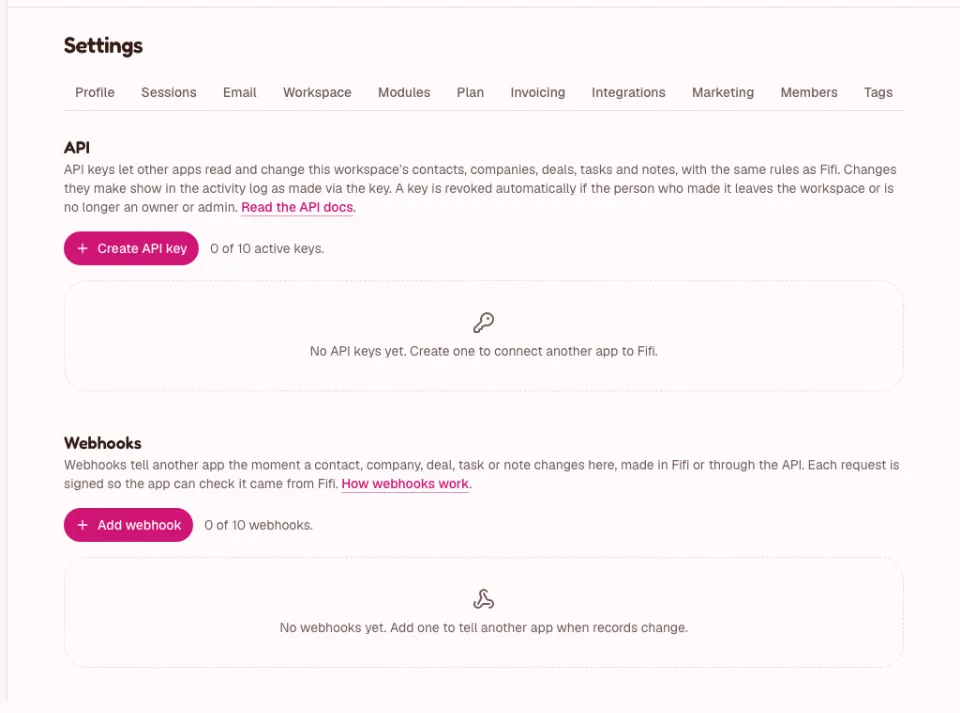
- Open Settings → API.
- Click Create API key.
- Enter a Name that says which tool uses it.
- Under Access, choose No access, Read or Read and write for each area. Start with Read and only add Read and write for the areas the tool must change. The areas are Contacts, Companies, Deals, Tasks, Notes, calls and meetings, Webhooks, Floor plans and seats, Service records, Loads, and Invoices and payments. The last four are read only.
- Choose when it Expires. Shorter is safer.
- Click Create key.
- Copy the key from Copy your API key into a password manager or your tool's secret store. You won't see it again.
A key acts as you, limited to the access you gave it, and only reaches your workspace. If you are deactivated or stop being an owner or admin, Fifi revokes your keys for good.
Heads up
Treat a key like a password. Never paste it into a chat, an email or a support request, and never put it in a web page or a mobile app. Fifi never needs yours.
2. Make your first request
- In a terminal, set two variables with your Fifi address and your key.
- Ask who the key is:
export FIFI=https://app.fetchfifi.com
export FIFI_API_KEY=fifi_xxxxxxxx_...

curl "$FIFI/api/v1/me" -H "Authorization: Bearer $FIFI_API_KEY"
What you'll see: the workspace, the key's name, its access and expiry, and its rate limits. Then list some contacts:
curl "$FIFI/api/v1/contacts?limit=5" -H "Authorization: Bearer $FIFI_API_KEY"Lists come back as data with a next_cursor for the next page. Money is whole cents, times are UTC and unknown fields are refused. The rules, filters and errors are in API keys and the REST API.
The areas added for newer features, service records, loads, and invoices and payments, are read only, so a tool can report on them but not change them. Their endpoints are /service-records, /loads, /invoices and /payments.
3. Add a webhook
- In Settings → API, scroll to Webhooks and click Add webhook.
- Enter the Endpoint URL. It must be
https://, with a public host name. - Tick the Events to send, only the ones your tool uses.
- Click Add webhook and copy the signing secret that starts with
whsec_. It is shown once. - On the endpoint's page, click Send test event.
Fifi signs every delivery. Your tool must check the Fifi-Signature header against the signing secret and the raw request body before it trusts the request, and must answer with a 2xx status within 10 seconds. A short function that does the check is in Webhooks. Fifi may send an event more than once, so use its id to skip duplicates.
4. Rotate keys and secrets
To replace an API key:
- Create a new key with the same access.
- Put it in the tool and confirm the tool works.
- In Settings → API, click Revoke next to the old key and confirm. It stops working at once and can't be undone.
To replace a webhook's secret, open the endpoint and click Roll secret, then copy the new one. For 24 hours Fifi signs with both, so nothing is missed while you switch. See Webhooks.
If a key may have leaked, revoke it first and make a new one after.
What you'll see
- The key in the list with its status (Active, Paused, Expired or Revoked), when it was last used and from where.
- The webhook with a delivery log of recent deliveries: Delivered, Retrying, Waiting or Failed.
- Changes made through a key in the activity log as "you via API key".
Check your work
- To do: The key has only the access the tool needs, and an expiry.
- To do: The key is stored in a secret store, not in a document or chat.
- To do:
/api/v1/meanswers with your workspace. - To do: The test event shows Delivered in the log.
- To do: Your receiver rejects a request with a wrong signature.
- To do: You wrote down when the key expires.
Troubleshooting
| What you see | Why | What to do |
|---|---|---|
401 unauthorized right after creating a key | The key was copied only in part. | Copy the whole key, including fifi_. |
403 insufficient_scope | The key lacks the access the request needs. | Create a new key with that access and revoke the old one. |
403 module_disabled | The API module, or the area's module, is off, or the plan doesn't include it. | Turn it on in Settings → Modules. |
429 rate_limited | Too many requests. | Wait for the Retry-After seconds. |
| A webhook shows Failed or Retrying | Your address isn't answering with a 2xx status in 10 seconds. | Fix the receiver; Fifi retries on a schedule. |
| A key shows Paused | The person who created it isn't active. | Create a new key as an active owner or admin. |
Related
- API keys and the REST API: every endpoint, filter and error.
- Webhooks: events, payloads, signatures, retries.
- The live reference is the /developers page, and the OpenAPI document is at
/api/v1/openapi.json. - Set up your team
Something out of date? Tell us.