
Send your first campaign
About 30 minutes · For owners and admins · Needs Pro or Business · Last checked in v0.61.0, Oct 2026
A campaign is one email to many contacts, sent from your own mailbox a few at a time, with opens, clicks, replies and unsubscribes tracked. This guide takes you from nothing to a sent campaign and a first look at the results. It covers a plain first email; the designer, pacing and pause rules are in Campaigns.
Before you start
- Who can do it: anyone can create a draft and send themselves a test. Only owners and admins can start or schedule it.
- Needs: the Campaigns and Email modules (Pro or Business; Pro allows 5,000 campaign emails a month, Business Unlimited). To have Ask Fifi draft the email you also need the Ask Fifi add-on ($5 a month for 50 questions) and AI for marketing switched on in Settings → Marketing.
- Have ready:
- To do: A connected mailbox for the person who will start the campaign. See Connect your email. The campaign goes out from their mailbox.
- To do: A business address in Settings → Workspace. The law requires it in every campaign email, so Fifi won't start one without it. See Set up your logo, colors and business details.
- To do: Contacts with email addresses. See Bring in your existing customers.
- To do: An idea for one useful email. Start small: a short update, an offer or a reminder.
Fifi adds your business name and address and an unsubscribe link to the bottom of every campaign email. Anyone who unsubscribes is suppressed for the whole workspace and never gets a campaign from anyone in it again.
Pick a first campaign
If you aren't sure what to send, start with one of these. They are the same drafts Ask Fifi offers each kind of business.
| Business type | A good first campaign | Ask Fifi's suggestion |
|---|---|---|
| B2B sales | Tell contacts with an open deal about something new. | “Announce something new to contacts with an open deal” |
| Agency or consulting | Tell clients with a live project about something new. | “Announce something new to clients with an open project” |
| Appointment services | Invite people who never booked to book online. | “Invite people who never booked to book online” |
| Pet services | Win back clients who haven't visited in two months. | “Win back clients who haven’t visited in 60 days” |
| Home and field services | Remind customers on a repeat plan that spring service is due. | “Draft a spring email to customers on a quarterly plan who haven’t booked since July” |
| Real estate | Tell contacts with an open deal about a new listing or service. | “Announce something new to contacts with an open deal” |
| Nonprofit | Send supporters a short update. | “Draft a short update email to all supporters” |
| Freight and logistics | Tell shippers with an open lane about a new lane. | “Announce a new lane to shippers with an open lane” |
| Other | Tell contacts with an open deal about something new. | “Announce something new to contacts with an open deal” |
Some suggestions need a module: the "visited" and "booked" ones need Booking, and the "open deal", "open project" and "open lane" ones need Deals. Ask Fifi only offers what your modules support.
Steps
1. Create the draft
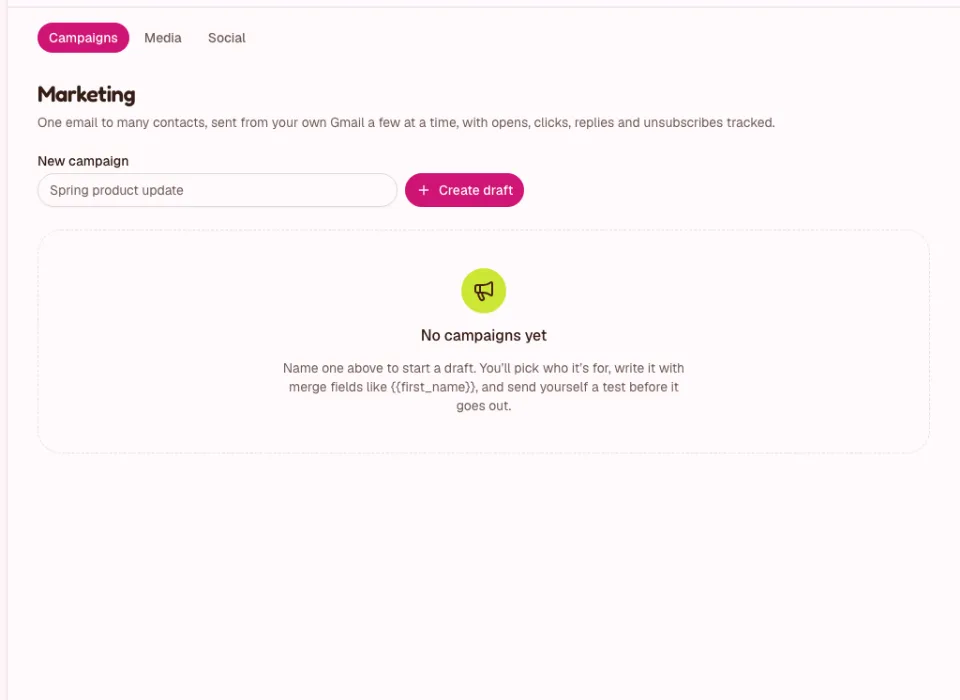
- Click Marketing in the menu.
- Under New campaign, type a name that tells you what it is, for example "Spring update", and click Create draft.
A draft can be edited and deleted freely. Nothing is sent.
2. Choose who it's for
- Under Who it’s for, pick Contacts matching filters and set one or two filters, for example Lead status or Tags. Leave a filter empty to skip it. Or pick Everyone at chosen companies and click Find companies.
- Read the sentence under the filters that says who the audience is, and the count below it. Fifi lists who is left out and why: no email address, unsubscribed, or the same address as another contact.
A campaign can go to up to 5,000 people. For your first one, a small group you know is a good start.
3. Write it, or have Ask Fifi draft it
Write it yourself
- Pick the Email type Plain text. It looks like an email you would write in Gmail.
- Type the Subject, and a short Preview text if you like (the line mail apps show after the subject).
- Write the message. Use merge fields to fill in each person's details, such as
{{first_name|there}}, which says "there" when a contact has no first name.
Or have Ask Fifi draft it
- Click Draft with Ask Fifi next to New campaign, finish the sentence in the box, for example "Draft a campaign to contacts who haven't visited in 60 days", and press Enter.
- Fifi builds the audience, writes the subject, preview line and body in your brand voice, and saves a draft labelled Drafted by Ask Fifi. It tells you how many people it reaches. It never sends anything.
- Click Open draft and read every word. Check any dates, prices or offers, and who it goes to. Edit what you like, or ask Fifi in the same conversation to make it shorter or warmer.
The button only appears when drafting is available to you. A drafting request counts as one Ask Fifi question. The details are in Ask Fifi.
4. Send yourself a test
- Under Test and send, click Send me a test.
- Open it in your mailbox. The subject starts with "[Test]", sample names are filled in and nothing is tracked.
- Check the greeting, the links, the business address and the unsubscribe link at the bottom.
Use Preview for to see how it reads for a particular contact.
5. Send it
An owner or admin does this step.
- Under Test and send, optionally set Send later to schedule it up to 90 days ahead.
- Click Start sending (or Schedule) and confirm. Fifi tells you how many people it goes to and from which mailbox.
What you'll see: "Sending to N people, a few a minute." Fifi sends a few emails a minute with a daily cap for each mailbox, so a large campaign takes more than a day. The numbers are in Campaigns. You can Pause it, and only the person who started it can Resume.
6. Read the results
- Open Marketing. The list shows each campaign's Status, Audience, Sent, Opened, Replied and Unsubscribed.
- Open a campaign for Clicked, Skipped, Failed and a table of every recipient.
Opens are a guide, not a count of people who read it: some mail apps open emails on their own. Replies land in your Inbox and on the contact's timeline. Clicks, opens and unsubscribes appear on each contact's timeline too.
What you'll see
- The campaign shows Sent once everyone has been sent to.
- Each contact's timeline shows that they got it, and whether they opened, clicked, replied or unsubscribed.
- Anyone who unsubscribes sees "You're unsubscribed" and is left out of every future campaign.
Check your work
- To do: The audience count is what you expected, and you understand who is left out.
- To do: You read the test email on your phone and on a computer.
- To do: The business address and the unsubscribe link are at the bottom.
- To do: Nothing in a draft from Ask Fifi is a date, price or promise you didn't mean.
- To do: After sending, you looked at Replied and answered every reply.
Troubleshooting
| What you see | Why | What to do |
|---|---|---|
| "An owner or admin starts campaigns." | You are a member. | Ask an owner or admin to start it. |
| "Paused: add the workspace's postal address in Settings → Workspace." | No business address. | Add it in Settings → Workspace, then Resume. |
| "Paused: the sender's Gmail needs reconnecting in Settings → Email." | The mailbox lost access. | The person who started it reconnects, then resumes. |
| Fewer people than expected. | Some were left out. | Check the reasons under Audience (as saved). |
| "This email is too long: Gmail would cut it off…" | Gmail hides the end of very long emails. | Shorten it. |
| No Draft with Ask Fifi button. | Ask Fifi, Campaigns or AI for marketing is off, or it isn't in your plan. | See Ask Fifi. |
Related
- Campaigns: the designer, pacing, pause and resume, unsubscribes.
- Ask Fifi
- Connect your email
- Know your numbers
Something out of date? Tell us.