
Using the Help center
About 3 minutes · For everyone · Last checked in v0.61.0, Oct 2026
The Help center is the guides in this folder, on the web at /help. You don't need to sign in to read it. This page shows how to find a guide fast and how to read the extras you'll see in them.
Find a guide
Type in Search help at the top of any page. Fifi looks in three places, in this order:
- Guide titles.
- Headings inside guides.
- The words in the guides themselves, so a field name or a button label finds the step that uses it.
Use the arrow keys to move down the list and press Enter to open the one you want. Press Escape to clear the box. A search for api key shows the guides that mention it, with the words around the match:
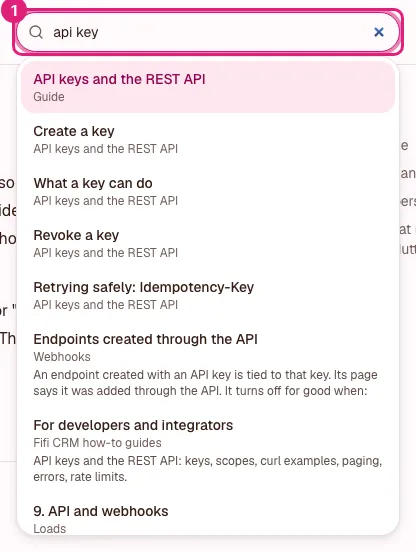
Search only shows guides you can read. If you can't find something, try a shorter word, or browse the list on the guides home page.
The strip under a title
Guides for setting things up start with a line like this:
About 25 minutes · For owners · Needs Pro or Business · Last checked in v0.61.0, Nov 2026
- The time is how long it takes to do the steps, not to read them.
- "For owners" says who can do the steps. Anyone can read any guide.
- "Needs" is the lowest plan with everything the guide uses. See Modules and plans.
- "Last checked" is the Fifi version someone followed the guide against, and the month.
Tips, notes and warnings
A shaded box with a label in words is an aside. The label tells you what kind it is, so you never need to rely on color.
Tip
A tip is a shortcut or a good habit. You can skip it.
Note
A note is a fact that helps you understand the step above it.
Heads up
A heads-up is something that can't be undone or that affects other people. Read it before you continue.
Needs v0.57.0
This label means the feature arrived in that version. If your workspace is on an older one, the step won't be there yet.
Checklists
Some guides end with a checklist you can print. The boxes aren't saved, so tick them on paper or keep your place by reading.
- To do: Open the Search help box and look for a field name you use every day.
- To do: Open a guide that has a strip under its title.
- Done: Read this page.
Out of date?
If a guide has a button name, price or number that doesn't match what you see in Fifi, tell us. Guides in a series end with a Tell us link that starts an email to support with the guide's name in the subject. Prices and limits in guides are read from the same place as the Plan page, so they stay in step with the app.