
Move invoices into QuickBooks with a file
About 25 minutes · For owners and admins · Needs Pro or Business · Last checked in v0.61.0, Oct 2026
Fifi writes a file of your issued invoices, or of the payments you received, and you import it into QuickBooks. Nothing leaves Fifi until you import the file yourself. This guide helps you pick the right file, export it, and import it without entering anything twice. It doesn't cover the automatic sync (Connect QuickBooks Online), other accounting software or refunds (What Fifi doesn't do).
Before you start
- Who can do it: owners and admins. Members can use Export CSV on the Invoices list, which is a spreadsheet, not a QuickBooks file.
- Needs: the Invoicing module (Pro or Business) and issued invoices. Drafts and void invoices aren't exported.
- Have ready: QuickBooks open in another window, and the names it uses for your product or service, your sales tax item and (for Desktop) your accounts. They must match exactly, capital letters and spaces too.
- Using the sync? If QuickBooks Online is connected, Fifi already sends invoices and payments. Importing a file as well can enter them twice. Use a file only for what Fifi hasn't sent, such as invoices from before you connected.
Pick a file
| You use | You import | What goes in the file |
|---|---|---|
| QuickBooks Online | An invoice CSV, in Settings → Import data → Invoices | Issued invoices with their lines, up to 100 invoices a file. No discount lines. Sales tax only as a plain line |
| QuickBooks Desktop | An IIF file, in File → Utilities → Import → IIF Files | Issued invoices (with discounts and sales tax) or received payments, one kind a file. Up to 500 invoices or 2,000 payments a file |
QuickBooks Online has no way to import payments from a file, so a payments file is for Desktop only. In Online, record payments in QuickBooks by hand, or use the sync.
Steps
- Open Settings → Invoicing and find the QuickBooks card. Check the names under Names in QuickBooks (below), then click Save names.
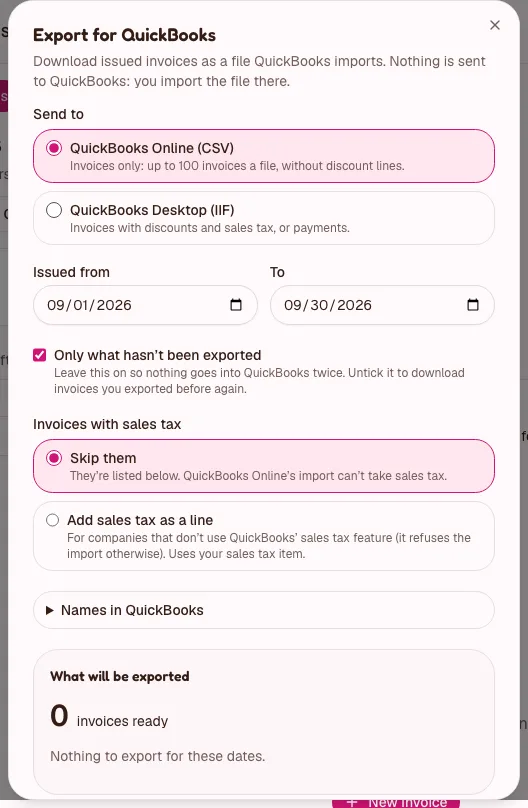
- Open Invoices and click Export for QuickBooks. For payments, open Invoices → Payments and click Export payments for QuickBooks Desktop.
- Under Send to, choose QuickBooks Online (CSV) or QuickBooks Desktop (IIF).
- For Desktop, under What, choose Invoices or Payments.
- Set Issued from and To (for payments, Received from and To). It starts with the previous calendar month. A range is at most 2 years.
- Leave Only what hasn't been exported ticked. It keeps an invoice that went into one file from going into another.
- For a CSV, choose what happens to invoices with sales tax under Invoices with sales tax: Skip them, or Add sales tax as a line.
- Read What will be exported: how many invoices are ready, how many were already exported, and a list of what can't be exported and why.
- Click Download.
- Import the file into QuickBooks, as in the sections below.
- If more are waiting, the button now says Download the next 100. Import this file first, then download the next.
What you'll see: a file such as fifi-invoices-quickbooks-desktop-2026-10-31.iif, and on each exported invoice "Exported for QuickBooks · Oct 31". The Invoices list has a Not exported for QuickBooks filter.
Heads up
A file is marked as exported when Fifi builds it, before your browser has saved it. If the download fails part-way, untick Only what hasn't been exported and use the same dates to get it again.
Names in QuickBooks
QuickBooks only accepts names it already has, spelled exactly the same. Set these once on the QuickBooks card in Settings → Invoicing, or in the export dialog under Names in QuickBooks. Both are the same form.
| Field | What it's for |
|---|---|
| Product or service | Written on every invoice line. The default is Services. A colon, as in Services:Pest control, is a sub-item in QuickBooks |
| Other names for some lines (optional) | A different name for visits, stays, service records, deals, loads, typed lines or discounts |
| Sales tax item | Used for invoices with sales tax. Empty means those invoices are listed, not exported |
| Account names (QuickBooks Desktop) | Your receivables, income, sales tax and deposit accounts. The defaults are Accounts Receivable, Services, Sales Tax Payable and Undeposited Funds |
Customer names come from each invoice's Bill to. A colon in a customer name becomes " - ", because QuickBooks reads a colon as a job. QuickBooks Desktop cuts customer names at 41 characters; the preview says which.
Import into QuickBooks Online
These are Intuit's screens, which change. Use Intuit's help if a menu has moved (as of October 2026).
- Turn on Custom transaction numbers in QuickBooks: Settings → Account and settings → Sales tab → Sales form content. Without it, QuickBooks renumbers your invoices.
- Open Settings → Import data → Invoices, upload the file and pick the date format MM/DD/YYYY.
- Tick the option to add customers that don't exist yet.
- Check that your product and service names exist in QuickBooks. For a name it can't find, the importer uses its generic Sales item.
QuickBooks Online refuses the import if your company uses its sales tax feature. That is a limit of QuickBooks, not Fifi. Add sales tax as a line is for companies that track tax outside QuickBooks' sales tax: the tax goes in as a line. Otherwise skip taxed invoices and enter them by hand, or use the sync.
The CSV for a Harbor Grill pest control invoice with sales tax added as a line reads:
InvoiceNo,Customer,InvoiceDate,DueDate,Terms,Memo,Item(Product/Service),ItemDescription,ItemQuantity,ItemRate,ItemAmount
INV-1042,Harbor Grill,10/03/2026,11/02/2026,Net 30,PO 5512 / Thank you!,Services,"General pest service, Oct 3",3,33.33,99.99
INV-1042,Harbor Grill,10/03/2026,11/02/2026,Net 30,PO 5512 / Thank you!,Services,Bait station refill,4,7.50,30.00
INV-1042,Harbor Grill,10/03/2026,11/02/2026,Net 30,PO 5512 / Thank you!,Services,Trip charge,1,15.00,15.00
INV-1042,Harbor Grill,10/03/2026,11/02/2026,Net 30,PO 5512 / Thank you!,NC Sales Tax,Sales tax 8.875%,1,11.54,11.54
The last row is the tax: your sales tax item, quantity 1, the tax amount, and the words "Sales tax 8.875%". A retainer with no tax is a single row:
InvoiceNo,Customer,InvoiceDate,DueDate,Terms,Memo,Item(Product/Service),ItemDescription,ItemQuantity,ItemRate,ItemAmount
INV-1043,Meridian Consulting LLC,10/05/2026,11/19/2026,,,Services,"Monthly retainer, October",1,2500.00,2500.00
Import into QuickBooks Desktop
Back up your company file first. Intuit warns that IIF files are easy to get wrong.
- In QuickBooks Desktop, choose File → Utilities → Import → IIF Files and pick the file.
- Customers that don't exist are added by name. Existing ones are left as they are, so addresses aren't overwritten.
- The accounts and items you named in Fifi must exist, spelled the same.
- For a payments file, note that an IIF payment can't say which invoice it is for. QuickBooks applies it for you if Automatically apply payments is on (Edit → Preferences → Sales & Customers). Otherwise it waits as a credit to apply in Receive Payments. The payment's reference is the file's reference number (at most 11 characters) and its memo is the invoice number.
The same invoice as an IIF file, with its sales tax. Desktop's file can also carry discounts. Each line is tab-separated:
!TRNS	TRNSID	TRNSTYPE	DATE	ACCNT	NAME	AMOUNT	DOCNUM	MEMO	CLEAR	TOPRINT	NAMEISTAXABLE	ADDR1	ADDR2	ADDR3	ADDR4	ADDR5	DUEDATE	TERMS
!SPL	SPLID	TRNSTYPE	DATE	ACCNT	NAME	AMOUNT	DOCNUM	MEMO	CLEAR	QNTY	PRICE	INVITEM	TAXABLE	EXTRA
!ENDTRNS
TRNS		INVOICE	10/03/2026	Accounts Receivable	Harbor Grill	156.53	INV-1042	PO 5512 / Thank you!	N	N	Y	Harbor Grill	12 Pier Rd	Wilmington, NC 28401			11/02/2026	Net 30
SPL		INVOICE	10/03/2026	Services		-99.99		General pest service, Oct 3	N	-3	33.33	Services	Y
SPL		INVOICE	10/03/2026	Services		-30.00		Bait station refill	N	-4	7.50	Services	Y
SPL		INVOICE	10/03/2026	Services		-15.00		Trip charge	N	-1	15.00	Services	N
SPL		INVOICE	10/03/2026	Sales Tax Payable		-11.54		Sales tax 8.875%	N		8.875%	NC Sales Tax	N
A payments file for that invoice's check looks like this. It names the invoice in the memo, because IIF can't link the two:
!TRNS	TRNSID	TRNSTYPE	DATE	ACCNT	NAME	AMOUNT	DOCNUM	MEMO	PAYMETH
!SPL	SPLID	TRNSTYPE	DATE	ACCNT	NAME	AMOUNT	DOCNUM	MEMO
!ENDTRNS
TRNS		PAYMENT	10/20/2026	Undeposited Funds	Harbor Grill	156.53	1042	INV-1042	Check
SPL		PAYMENT	10/20/2026	Accounts Receivable	Harbor Grill	-156.53		INV-1042
ENDTRNS
What isn't exported, and why
The preview lists each of these instead of writing it:
- A void invoice is never exported. If you exported it before voiding it, the preview says so ("exported on 10/31/2026, so void it in QuickBooks").
- A refund or a voided payment isn't exported. Record refunds in QuickBooks by hand.
- A payment recorded in QuickBooks and brought in by the sync is already there, so the files leave it out.
- QuickBooks Online CSV: an invoice with a discount line (a negative price) can't be imported; enter it by hand. A taxed invoice is skipped unless you chose Add sales tax as a line.
- IIF: discounts and sales tax are carried, but a taxed invoice needs your Sales tax item, or it is listed.
Amounts are exact dollars and cents. A line Fifi rounded, such as 1.5 × $33.33, is written as quantity 1 with the original in its words, "Boarding, 1.5 nights (1.5 × $33.33)", so QuickBooks never works out a different total.
Exporting again
Every invoice or payment in a file is marked exported. To export something again, untick Only what hasn't been exported; it is marked again. If a file never reached you, the dialog shows Download that batch again for 24 hours after an export, which writes exactly the same invoices and changes no marks. Each download is in the activity log. You can export up to 20 times an hour, one at a time.
Check your work
- To do: The names under Names in QuickBooks match QuickBooks exactly.
- To do: You ticked Only what hasn't been exported.
- To do: The preview's list of what can't be exported was read, and you know what to enter by hand.
- To do: Custom transaction numbers is on in QuickBooks Online, or you backed up your Desktop file.
- To do: After the import, a number from the file, such as INV-1042, shows the same total in QuickBooks as in Fifi.
- To do: The Invoices list with Not exported for QuickBooks ticked shows only what you meant to leave.
Troubleshooting
| What you see | Why | What to do |
|---|---|---|
| "Nothing to export for these dates." | No issued invoices in the range, or all are already exported | Change the dates, or untick Only what hasn't been exported |
| "The end can't be before the start." | The dates are the wrong way round | Swap them |
| "Pick a range of up to 2 years." | The range is too long | Shorten it |
| "That file would be too large. Try a shorter range." | More than one file can hold | Export a shorter range, or use Download the next 100 |
| "You've reached the limit of exports for this hour. Try again later." | Up to 20 exports an hour | Wait an hour |
| "Another large export is running. Try again in a minute." | Another export is in progress | Wait a minute |
| "Someone else was exporting or changing these invoices at the same moment. Nothing was marked. Try again." | Two people exported at once | Try again |
| "The download didn't go through. Please try again." | The browser lost the connection | Try again. If the invoices may be marked, use Download that batch again |
| QuickBooks Online refuses the import | Your company uses its sales tax feature | Skip taxed invoices and enter them by hand, or use the sync |
| QuickBooks shows invoices twice | A file and the sync both sent them | Remove the duplicates in QuickBooks. Use only one way |
More in Invoicing troubleshooting.
Related
- Invoices: the reference for exports, including the activity log and limits.
- Connect QuickBooks Online: send invoices and payments automatically instead.
- Choose how you'll invoice: a file or the sync.
- Set up invoicing: the numbering that QuickBooks keeps.
Something out of date? Tell us.