
Your plan and billing
About 8 minutes · For everyone · Last checked Oct 2026
Every workspace starts on Free, with no card and no time limit. When you want more, an owner can try Pro or Business free for 14 days, or subscribe, in Settings → Plan. This guide covers choosing a plan, reading the plan page, the notices you may see about your trial or a payment, and what happens to your records if you move to a smaller plan. For what each plan includes, see Modules, business types and plans.
Before you start
- Who can do it: only owners start a trial, subscribe, change plans, update the card or cancel. Admins and members can open the page and read it, and are told to ask an owner.
| Task | Owner | Admin | Member |
|---|---|---|---|
| See the plan, the usage and the notices | Yes | Yes | Yes |
| Start a trial, subscribe, change or cancel the plan | Yes | No | No |
| Update the card, see invoices and receipts | Yes | No | No |
- Have ready: a card, if you want to start a trial. Fifi never sees your card number; you type it on Stripe's own page.
- Prices are in US dollars and don't include tax. Tax is added where it applies.
Choose your plan when you create a workspace
Right after Create your workspace, the owner sees Choose your plan, once:
- Pick Monthly or Yearly (2 months free).
- Choose Start on Free to go straight to your dashboard. Nothing is charged.
- Or choose Try Pro free for 14 days or Try Business free for 14 days. Fifi takes you to Stripe's page, where you enter a card.
If you came from the Pricing page with a plan already chosen, that plan is selected for you. You can still pick anything else, and you can change your mind later in Settings → Plan.
What you'll see: Start on Free is the first choice. A trial needs a card, but nothing is charged for 14 days. After 14 days the card on file is charged, and you can cancel before then at no cost.
Start a trial or subscribe
- Open Settings → Plan.
- Under the plans, pick Monthly or Yearly (2 months free).
- On the plan you want, click Start 14-day Pro trial, Start 14-day Business trial or, if your workspace has already had a trial, Subscribe to Pro or Subscribe to Business.
- Enter your card on Stripe's page and confirm.
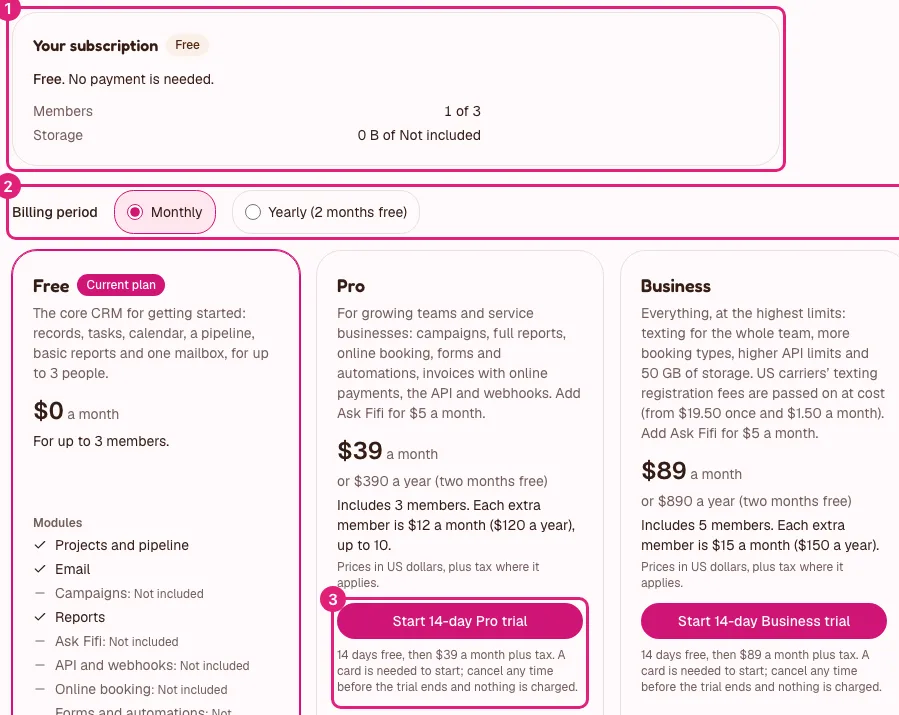
You come back to Settings → Plan. For a trial, a line tells you the trial has started and the day it ends, and that the card on file is charged then. No receipt is sent for a trial, because nothing is charged yet. For a paid start, the line says your plan is set up and that a receipt is on its way from Stripe. If the plan isn't shown for a few seconds, the page is still finishing; it updates by itself.
A workspace gets one free trial. Fifi reminds you before it ends (see the notices below), and Stripe emails a reminder too.
Read the plan page
Your subscription names the plan and says, in a word, what it is doing:
| It says | It means |
|---|---|
| Free | No payment is needed. |
| Trial: 12 days left | A trial of Pro or Business is running. The day it ends and the card is charged is shown. |
| Active | The plan is paid. It says if it bills monthly or yearly and the renewal date, or the day it ends if you set it to cancel. |
| Payment failed | The last payment didn't go through. You have a few days to fix it. |
| Read-only | The payment is overdue. You can read and export everything, but changes are paused. |
| Set by Fifi | Fifi set this workspace's plan by hand, so there is nothing to buy. Email support if you need something different. |
Under it you'll see how many members you have against the plan, how many extra members are on the bill, your storage, and Usage, a table of every limit. Extra members are added to your bill when they join and removed when they're deactivated.
Owners also get these buttons:
- Manage billing opens Stripe, where you update your card, billing address and tax ID, see invoices and receipts, or cancel at the end of the period (and resume).
- Pay now opens the unpaid invoice.
- Switch to Free asks you first, then ends the subscription. Your records stay.
- On a plan card: Upgrade to Business, Switch to Pro, or Switch to yearly billing. Moving up charges the difference now. Moving down credits your next invoice.
The notices you may see
A notice appears at the top of every page, with a title that says what it is about. Owners see the buttons; everyone else is told to ask an owner.
- Your trial is ending. From 3 days before it ends, owners see "Your Pro trial ends in 2 days", what the card will be charged, and Manage billing.
- Your last payment didn't go through. Owners see the date to update the card by, how many days are left, and Update card and Pay now. Everyone else sees "There's a billing problem" and that everything works as usual. For 7 days after a failed payment, nothing changes: everyone keeps working.
- This workspace is read-only. After 7 days without payment, changes are paused for everyone. You can still read, search and export everything, and nothing has been deleted. Owners see Pay now, Update card and Switch to Free. Paying, or switching to Free, brings editing back within seconds. This notice can't be dismissed.
- This workspace is over its plan. After moving to a smaller plan, owners see what is over (for example "Members: 5 of 3") and that nothing was deleted or hidden.
Dismiss hides a notice for a day. It comes back after that if it still applies, and a new problem always shows. Fifi remembers this in your browser only, as the Privacy Policy lists.
When a module is view and export only
If a workspace has a module on, but its plan doesn't include it, the module isn't taken away:
- It stays in the menu with a lock, and a notice at the top of its page says "Invoicing is view and export only on this plan." (for example).
- Everything you added is still there. You can open it, search it, put it in reports and export it.
- You can't add, change or send. The needed plan is named, and owners get See plans.
- Settings → Modules marks it View and export only.
Move back to the plan that includes it and everything works again, exactly as you left it.
The same goes for limits. If a workspace has more members, booking types or saved reports than its new plan allows, they all stay; you just can't add another until you're under the limit.
Buttons that are switched off
On a page where adding isn't possible, New, Add and Invite buttons are switched off and say why, right beside the button: the workspace is read-only, the module is view and export only on this plan, or the plan has no room for another one ("This workspace's plan has no room for another saved report. See Settings → Plan."). The button does nothing when pressed; the reason is there so you aren't left guessing.
Texting after you leave Business
Texting is part of Business. If a workspace moves to a smaller plan:
- Sending texts stops at once. Replies and STOP requests are still received.
- The number is kept for 30 days. Owners get an email the day it starts and another a week before the end.
- Then the number is released. Settings → Texting says so. If you come back to Business, choose Try again to get a new number; it goes through Fifi's review like any new number.
Move back to Business at any point in the 30 days and the number stays yours.
Check your work
- To do: Settings → Plan shows the plan you chose, with the right word under Your subscription.
- To do: After a trial, you can read the day it ends and that the card is charged then.
- To do: Your teammates can read the plan page and see "Ask an owner".
- To do: You know where Manage billing is, for your card and receipts.
Troubleshooting
| What you see | Why | What to do |
|---|---|---|
| "Thanks. We're finishing setting up your plan" | Stripe has taken the payment and Fifi is applying it. | Wait a few seconds. The page updates itself; refresh if it doesn't. |
| "Upgrades are temporarily unavailable" | Fifi couldn't reach Stripe. Nothing was changed. | Try again in a few minutes, or email support. |
| There are no buttons on the plan page | You're not an owner of this workspace, or the plan was set by Fifi. | Ask an owner. |
| "Pro allows up to 10 members" on the Pro card | The workspace has more people (invitations count too) than Pro allows. | Remove a few people or invitations, or choose Business. |
| Everyone sees "This workspace is read-only" | A payment is more than 7 days late. | An owner clicks Pay now or Update card, or switches to Free. Nothing has been deleted. |
| A button is switched off with a reason | The workspace is read-only, or the plan doesn't allow more. | Read the reason beside it. |
| You dismissed a notice and it came back | Dismissing lasts for the day. | Fix what it says, or dismiss it again. |
Related
- Modules, business types and plans
- Getting support: response times by plan.
- Roles and permissions
- Import, export and Trash: exporting everything.
- Texting
- The Terms of Service describe trials, renewal, refunds and what happens after a failed payment.